How to write a double (dual) dialogue
In scripts, as in life, there are sometimes moments when characters are unable to listen to each other without interrupting. If, as a writer, you feel that both scene participants need to speak at the same second, use the STARC double dialogue feature.
If you don't already have the Story Architect app or downloaded it a second ago, read the instructions on how to install it, as well as how to log in to your personal account.
Let's start at the beginning: open the project and go to the "Screenplay" tab by selecting it in the menu on the left.
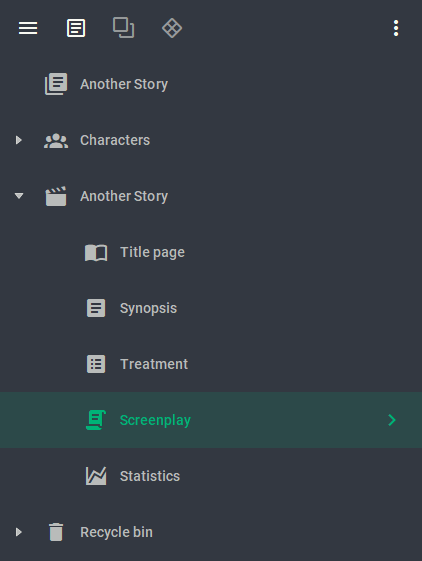
The text of our script will appear on the workspace. Isn't that where we want to insert the double dialog? Great, that's what we'll do. Put the cursor at the beginning of the line, select the text type "Character" in the upper panel, or use TAB, and right-click in an empty space. In the menu that appears, choose "Split Paragraph". An option for those in a hurry is the keyboard shortcut Ctrl+D.
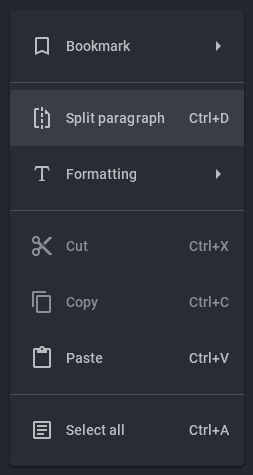
The line is split in half. Enter the first character's name, then press Enter and enter his/her line. Move the cursor to the second half of the line and do the same with the second character.

If you change your mind and want to let each character finish their line without interruption, right-click anywhere in the double dialog and select "Merge Paragraph."
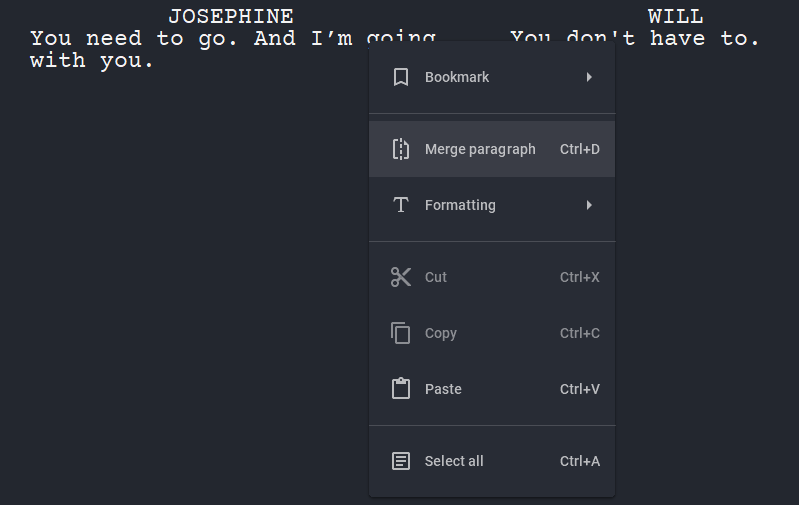
That's it! Now your characters can get a little more bold and speak when they want to, not when the script layout demands it.
Join our community of authors
Download Story Architect and try all features for free. Give us your feedback — let's make the best software for writers together!